RadarHub - AI Speed Radar & Traffic Vision (Python + YOLO)
Turn any camera into an AI speed radar
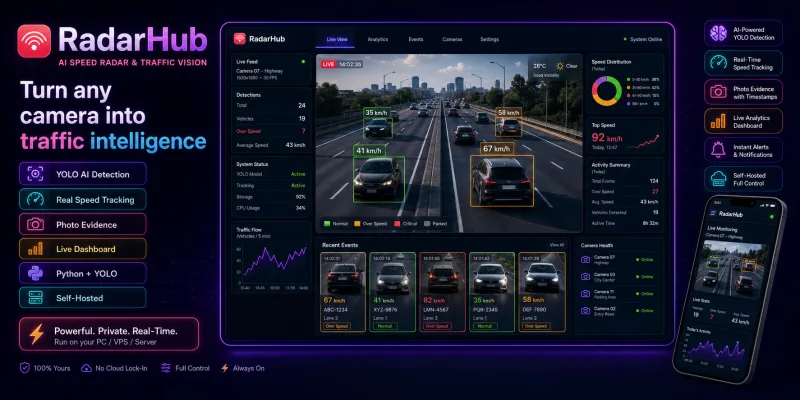
RadarHub watches any video feed and turns it into traffic intelligence: it detects every vehicle with AI, tracks each one, measures its real speed in km/h, counts traffic by type, and flags speeders with photo evidence. Everything runs on your own hardware: no cloud, no per-camera fees, no subscription.
Key features
- AI vehicle detection: cars, trucks, buses, motorcycles (pretrained YOLO, no training needed)
- Real speed measurement: calibrated perspective transform maps pixels to road meters, the professional method
- Persistent tracking: every vehicle keeps one stable ID across frames
- Violation logging: photo snapshot of every speeder + one-click CSV export
- Traffic counting: per-type counts on a virtual line
- Live web dashboard: annotated video, live counters, speeds and violations feed in any browser
- Three input types: video file, RTSP/IP camera, webcam / OBS virtual camera
- Point-and-click calibration: click 4 points, enter real meters, done
- Privacy by design: footage never leaves your machine
Perfect for
- Municipalities and campuses monitoring streets and school zones
- Parking, logistics and industrial sites enforcing site limits
- Traffic engineering consultancies running studies from any footage
What you get
Full Python source code, web dashboard, calibration tool, CLI, full documentation, test suite. Lifetime license, updates included.
- Unzip the package
- Run
python -m venv .venvand activate it pip install -r requirements.txt- Start:
python main.py dashboard --source 0and open http://localhost:8080 - Calibrate once per camera:
python main.py calibrate --source your-video.mp4 --width 3.5 --length 20
Full guide: see docs/documentation.html inside the package or the online docs.
Do I need a GPU?
No. CPU works with the default nano model. Any NVIDIA GPU gives real-time HD.
Is it legal for enforcement?
RadarHub is a measurement and analytics tool. Official fines usually require type-approved devices; use it for studies, private sites and monitoring, and check local regulations.
Does footage leave my machine?
Never. Detection, dashboard and snapshots are all local.
Multiple cameras?
Run one instance per camera on different ports.

RadarHub - AI Speed Radar & Traffic Vision (Python + YOLO)
- Registered business
Belgium, KBO 1042.245.006 - Stripe checkout
Card details never touch our server - Instant delivery
Download link right after payment - Invoice included
Downloadable from your dashboard
Try it before you buy it
The real RadarHub, on a phone or a laptop at its real screen size.
Turn your phone sideways for a bigger laptop
A real, working copy. Switch device any time, your session stays.